Edit a User in ParcVu Online
Last updated 3 days ago
To use this function, the user will need the Allow Access System Maintenance user permission
From the System Settings menu, under User Maintenance select Users
The System Settings menu in ParcVu Online is searchable - save time finding the setting you need by using key words!
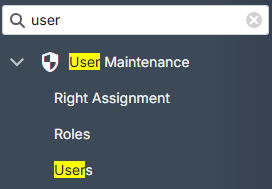
The existing Users will be loaded
Select the user you wish to amend
Make any required changes, remembering to Save at the top of the screen
NEVER just include all permissions as a shortcut
There are permissions intended for integrations users, which explicitly prevent the user from being able to log in to ParcVu Online directly. Users given these permissions will not be able to log in to ParcVu
Was this helpful?
Still need help? Share an idea