Delete a User in ParcVu Online
Last updated 3 days ago
To use this function, the user will need the Allow Access System Maintenance user permission
From the System Settings menu, under User Maintenance select Users
The System Settings menu in ParcVu Online is searchable - save time finding the setting you need by using key words!
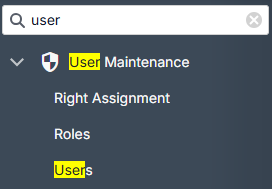
The existing Users will be loaded
Select the User you wish to delete
In the User Actions dropdown, choose Delete User
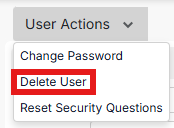
The user will no longer be able to log in to ParcVu Online
Delete User doesn’t remove the history of the User from the system, it simply deactivates the User Account and hides it from the active list. You’ll still be able to see their past actions, and audits won’t be changed
Deleted a User in error, or have a returning team member? Find out how to reinstate a deleted User here: Reinstate a Deleted User
Was this helpful?
Still need help? Share an idea